 Crowe Scripts
 Join our Discord

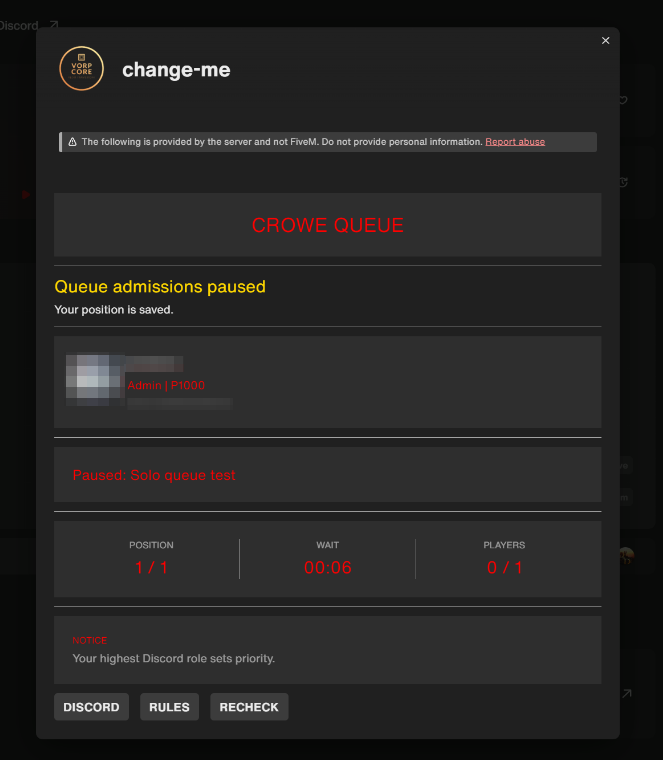
Crowe Queue v1 is a standalone, server-only RedM connection queue for VORP servers with Discord-role access, priority ordering, reconnect grace, protected capacity admission, and live Adaptive Cards.
Players receive a clear branded connection experience showing their queue position, elapsed wait, server capacity, Discord identity, selected role, rotating notices, and Discord, Rules, and Recheck actions. Behind the card, the queue preserves FIFO order for equal tiers, places higher-priority roles first, protects recent reconnects, force-checks Discord access before admission, and uses capacity leases so multiple deferred players cannot consume the same opening.
Showcase
Key Features
Discord Access & Queue Order
Discord-Role Whitelist - Grant access through configured Discord roles and select each player's highest matching tier.
Priority Ordering - Move higher numeric priorities first while preserving FIFO order for equal-priority players.
Reconnect Grace - Give successful players a five-minute reconnect tier above normal roles without bypassing real server capacity.
Duplicate Attempt Protection - Reject a second pending connection for the same license before making another Discord request.
Player Connection Experience
Live Queue Card - Show position, eligible queue count, elapsed wait, online players, capacity, selected tier, and numeric priority.
Discord and Steam Identity - Display the player's Discord name, avatar, and Steam identifier during the connection flow.
Three Clear Actions - Give every player Discord, Rules, and throttled Recheck buttons directly on the card.
Access Onboarding - Allow ten minutes for players to join Discord or receive a role, with automatic and manual rechecks.
Configurable Branding - Customize the queue name, public banner or logo, card messages, button labels, colors, and rotating advertisements.
Capacity & Discord Reliability
Admission Leases - Reserve an opening during connection handoff so simultaneous deferred players cannot overfill the server.
Final Access Recheck - Force-check current Discord membership and allowed roles immediately before releasing admission.
Live Capacity Tracking - Count connected players and active leases against the configured
sv_maxclients.Resilient Discord Requests - Includes request coalescing, caching, timeouts, rate-limit handling, and controlled stale-positive fallback.
Fail-Closed Access - Deny unusable results, invalid configuration, and missing identifiers instead of allowing an unsafe bypass.
Server Operations
txAdmin Event Awareness - Respond to scheduled restarts, skipped restarts, and shutdowns while txAdmin continues handling bans.
ACE-Protected Commands - Inspect queue status or pause and resume admissions through restricted console and in-game commands.
Pause Without Reordering - Hold eligible players in their current order without affecting anyone already connected.
Server-Only Architecture - Runs without a client script, NUI, database, framework dependency, exports, or custom network-event API.
Loading Screen Compatibility - Works with the short connection handover used by
crowe_loadingscreen.
Default Timing Profile
Queue card and advertisement refresh: 3 seconds
Automatic Discord access recheck: 15 seconds
Manual Recheck cooldown: 5 seconds
Discord request timeout: 10 seconds
Access onboarding window: 10 minutes
Admission lease: 30 seconds
Reconnect grace: 5 minutes
Dependencies
Resource Dependencies: None - no framework or database dependency
Discord Setup: A Discord application with its bot installed, plus the bot token, Discord Server ID, and allowed role IDs
Server Capacity: A configured
sv_maxclients
Installation
Place the complete
crowe_queuefolder in your server resources directory.Set the Discord token and Discord Server ID as server-only convars using
set, neversetr.Replace every example role ID, priority, URL, and branding value in
config.lua.Remove or comment out every
ensure hardcapentry in the executed server configuration.Start
crowe_queueearly, before VORP and other connection-time resources.Disable the VORP and txAdmin whitelists while keeping txAdmin ban checking enabled.
Restart the server and complete the included integration checklist on a staging copy of the real profile.
What You Will Receive
The complete
crowe_queueserver-only resource with Discord access, queue ordering, reconnect grace, capacity leases, Adaptive Cards, and txAdmin event handlingConfigurable role tiers, branding, card messages, buttons, advertisements, timing controls, cache policy, and ACE-protected administration
Detailed README, complete installation and troubleshooting guide, example server configuration, and staging integration checklist
Support
Review the included README and guide for bot creation, installation, testing, security, and troubleshooting guidance
Join our Discord for ticket-based support