 Crowe Scripts
 Join our Discord
Modern Pause Menu for RedM — Character Info, Announcements, and Customization.
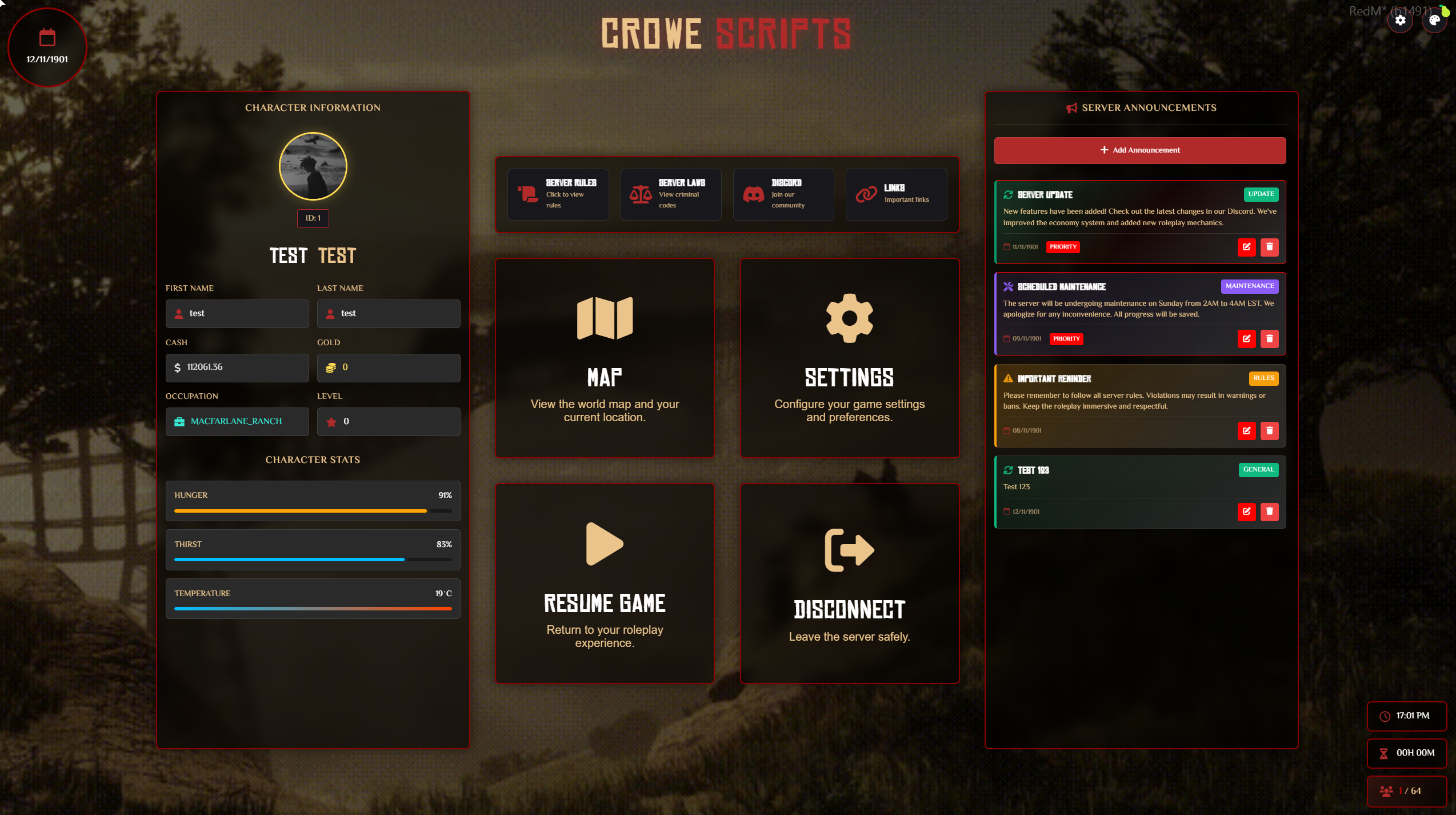
Crowe Pause Menu is a comprehensive pause menu system for RedM (VORP Framework). Deliver a beautiful, modern UI with character information, server announcements, customizable backgrounds, theme editor, and real-time server data — localized and integrated with VORP.
📸 Show your community what Crowe Pause Menu looks like in action!
✨ Key Features
🖥 Modern Pause Menu UI
Beautiful glassmorphism design with authentic Western styling
Responsive layout with custom dropdowns and modal dialogs
Keyboard-friendly interfaces with smooth animations
Beautiful, legible typography with self-hosted fonts
👤 Character Information Panel
Complete character display with player name, ID, and avatar (Steam profile picture)
Real-time money, gold, job, and rank/level information
Character stats: Hunger, Thirst, Temperature with visual progress bars
Clean card-based layout with icon indicators
📢 Server Announcements System
Comprehensive announcement board with multiple types (Info, Update, Event, Maintenance, Warning, News)
Priority levels: Normal, Priority, Urgent with visual indicators
Admin controls for full CRUD operations (Create, Read, Update, Delete)
Real-time synchronization across all players with automatic refresh
🎨 Advanced Background Customization
Support for multiple background types: GIF, Image, Video, YouTube, Slideshow
Custom dropdown selectors for easy media selection
Server-controlled default backgrounds with user override options
Smooth transitions and performance-optimized rendering
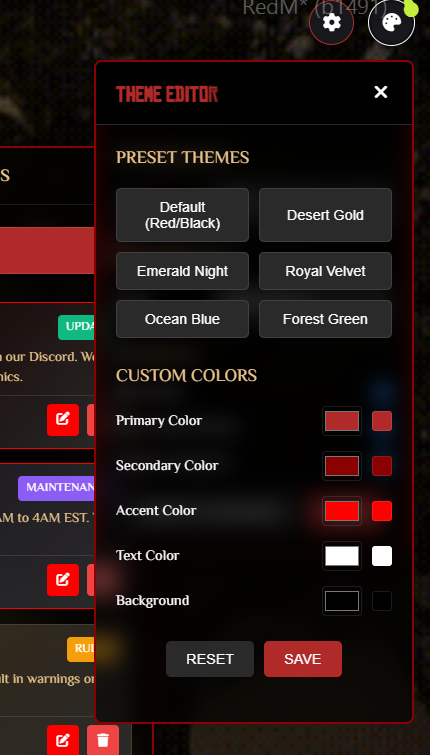
🎨 Theme & Color Editor
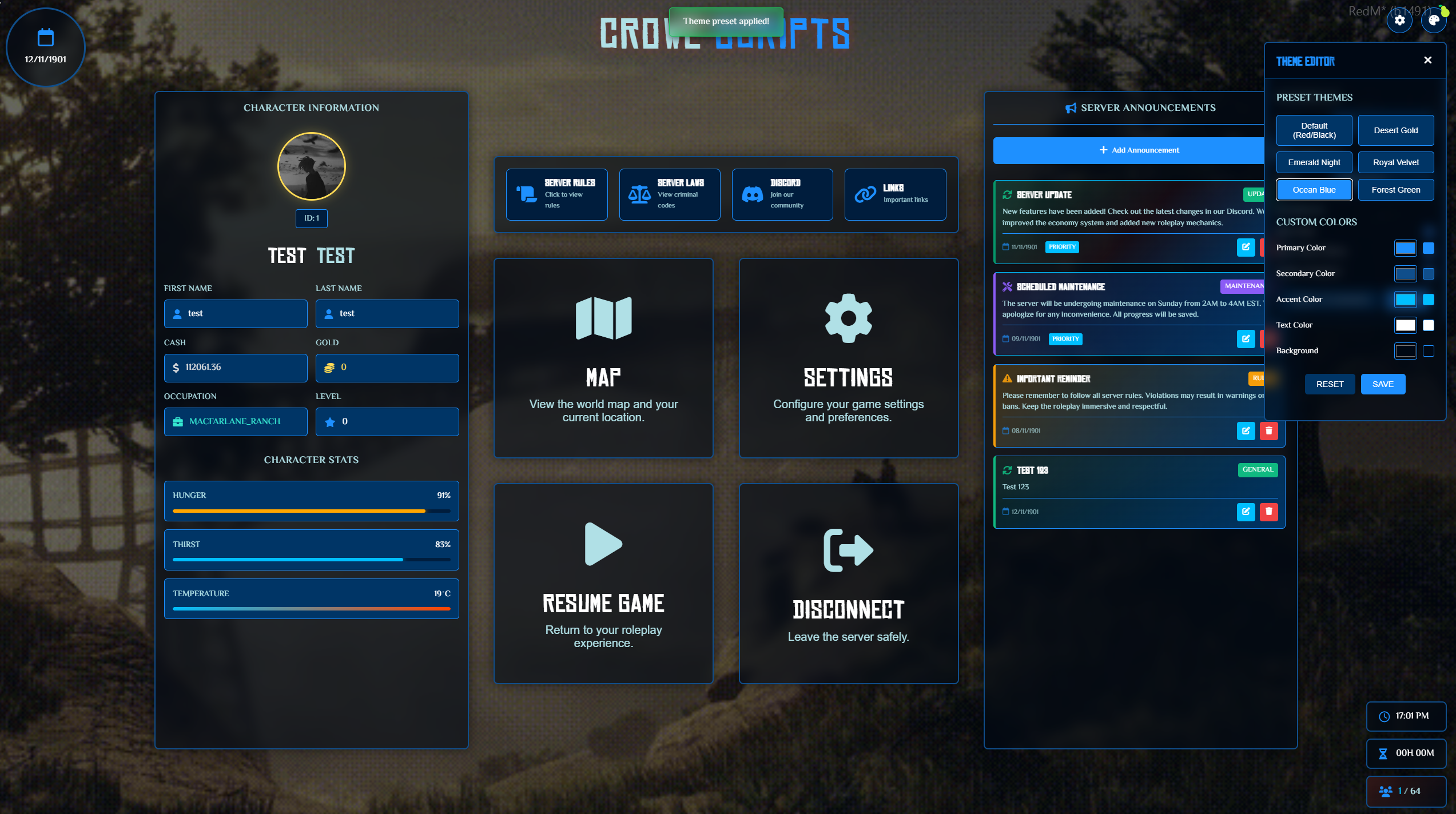
Built-in theme editor with preset themes (Classic Red, Ocean Blue, Forest Green, etc.)
Custom color picker for all UI elements (Primary, Secondary, Accent, Text, Background)
Real-time preview with localStorage persistence
Reset to defaults functionality
⚙️ Settings Panel
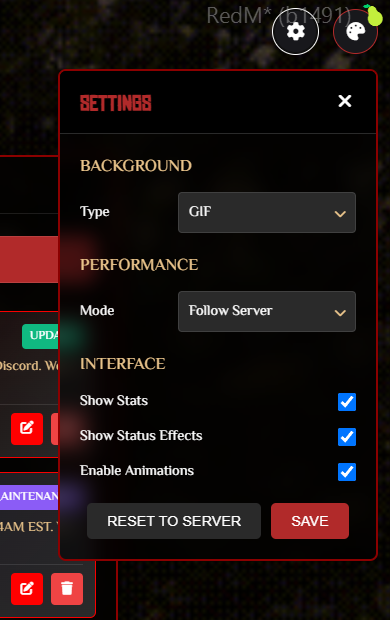
Background type selection (GIF, Image, Video, YouTube, Slideshow)
Performance mode selection (Low-end/High)
UI toggles: Show Stats, Show Status Effects, Enable Animations
User preferences saved to localStorage
🕐 Real-Time Server Information
Circular date display in upper left corner with configurable year (default 1901)
Server time and online time display in bottom right
Real-time player count with max players indicator
Hover tooltips for all time/date elements
🔗 Server Info Banner
Quick access banner above action buttons with links to Server Rules, Laws, Discord, and Important Links
Custom link copy modal (RedM-compatible) with copy-to-clipboard functionality
JavaScript-based link handling (RedM limitation workaround)
🎯 Action Buttons
Four main actions: RedM Map, Settings, Resume Game, Disconnect
Beautiful glass-panel design with hover effects and icon indicators
Responsive sizing for all screen sizes (2x2 grid layout)
👨💼 Admin Features
Steam ID-based admin permission system
Full CRUD operations for announcements (Create, Read, Update, Delete)
Real-time announcement synchronization across all players
Custom modal dialogs (no browser dialogs)
🌍 Localization
14 languages included (en, es, fr, pt, de, it, ru, pl, tr, zh, ja, ko, nl, ar). Easy to extend.
Separate server notification locales; manifest auto-loads all locales via
locales/*.lua
💼 VORP Integration
Built for VORP (
vorp_core), optionalcrowe_libsfor framework-independent functionsAutomatic framework detection with fallback support
🎨 Modern UI Enhancements
Unified theming, self-hosted fonts, consistent layout across all resolutions
Performance-friendly with authentic Western aesthetic
⚙️ Configurable
Clean
config.luacontrols server name, locales, links, date year, max players, and admin permissionsEditable
config.jsfor UI settings, backgrounds, themes, and performance options
🚀 Performance Optimized
Efficient NUI updates, localStorage caching, optimized background rendering
Low-end mode support for reduced effects
📱 Responsive Design
Adapts to all screen sizes with breakpoints for standard monitors, smaller screens layouts
Compact design for smaller monitors with adjusted button sizes and text scaling
🛠 Simple Setup
No database required. JSON-based announcement storage (
announcementData.json)Easy configuration via
config.luaandconfig.js
🔗 Integration Ready
Export functions for external resources
Real-time player count updates and event-based announcement refresh system
🧰 Dependencies
vorp_coreOptional:
crowe_libs(recommended),vorp_metabolism(for stats)
⚙️ Installation
Ensure you have all required dependencies installed
Place the
crowe_pausemenufolder into your server's/resourcesdirectoryAdd
ensure crowe_pausemenuto yourserver.cfg(after dependencies)Configure
config.lua(server name, locales, links, year, max players, admins)Configure
config.js(backgrounds, themes, performance)Restart your server
📦 What You Will Receive
✅ Fully optimized
crowe_pausemenuRedM script (Keymaster escrow encrypted)🧩 Editable
config.luaandconfig.jsfor easy customization📘 Full installation + usage guide
📤 Automatic delivery via Keymaster (Tebex orders)
🤝 Manual delivery (PayPal) available through Discord support ticket
🔧 Installation
Ensure
vorp_coreis installed (optional:crowe_libs,vorp_metabolism)Place
crowe_pausemenuin your server's/resourcesdirectoryAdd
ensure crowe_pausemenuto yourserver.cfgConfigure
config.luato fit your server setupConfigure
config.jsfor UI settingsRestart your server
🔑 License
This script is licensed for personal use only.
Redistribution, resale, or use on unlicensed servers is strictly prohibited.
Escrow-protected via Cfx.re Keymaster
Licensed for use on one (1) server key
🙋 Support
Need help?
📖 Review the README for configuration guidance and known issues
🧑💻 Join our Discord Server for support and community
📨 Or open a support ticket via Tebex or email