 Crowe Scripts
 Join our Discord
Bring your world to life with smart, stylish, and immersive notifications.
Crowe Notification v2 is a full design remake of our proven notification system for RedM. We reused the stable core logic and redesigned the presentation, flow, and controls for a cleaner, faster, and more modern experience across all servers.
🖼️ Showcase
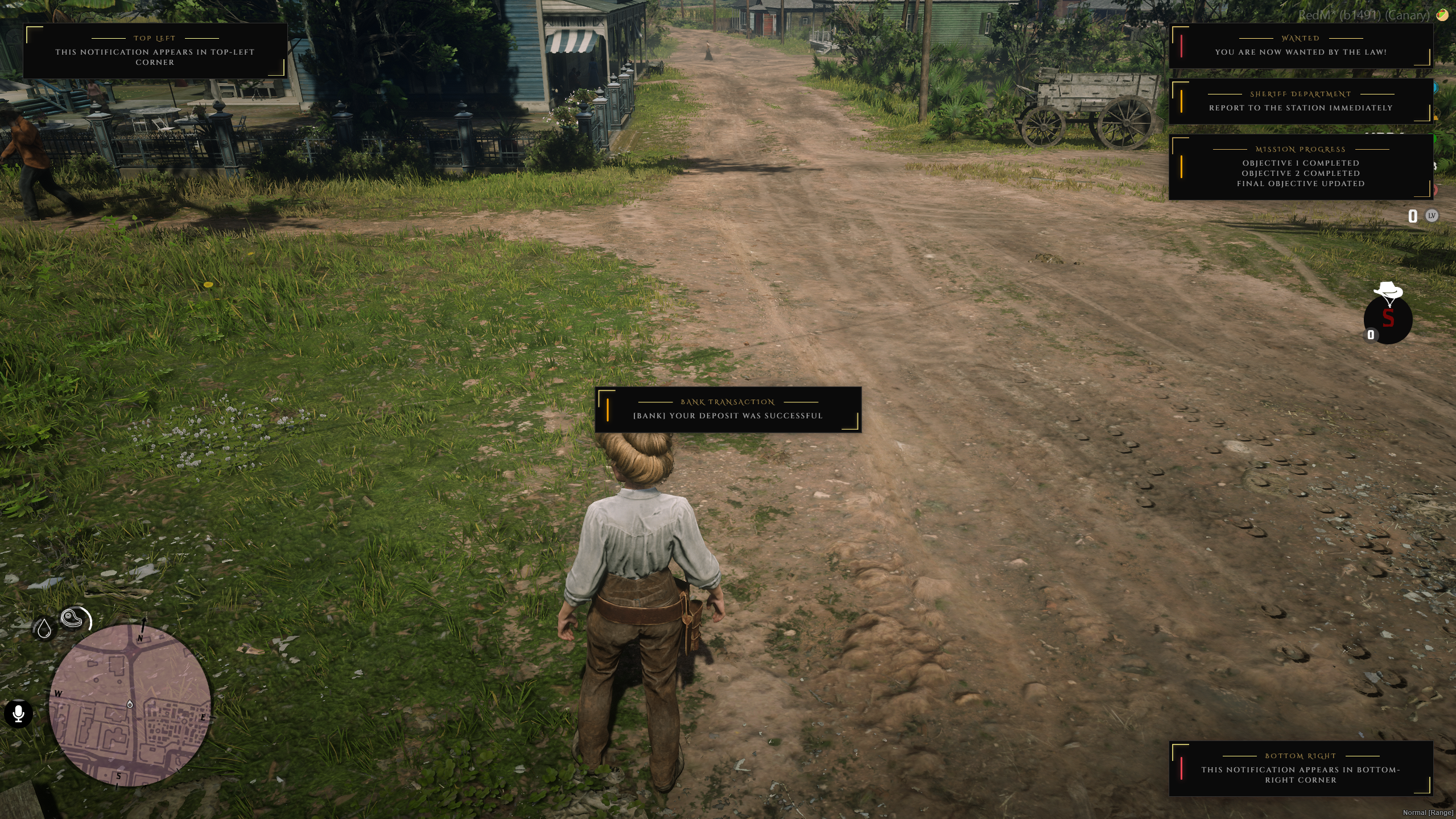
📸 Show your community what Crowe Notification v2 looks like in action!
✨ Key Features
🛎️ Smart Notification Stacking
- Multiple notifications display simultaneously with smooth animation, ordered by priority (info, social, job, emergency).
🎨 v2 Design Remake
- Core system reused and optimized, with a redesigned visual layout and interaction behavior for a premium modern look.
📍 Multi-Position Support
- Display notifications at top-right, top-left, bottom-right, bottom-left, or center.
🧠 Auto Priority Detection
- Messages can auto-detect urgency based on configurable keywords, with manual priority override available.
🔊 Sounds & Animations
- Custom sounds and animation styles (fade, shake, pulse, slide) for richer in-game feedback.
🏷️ Grouping + Instant Clear
- Group related notifications to avoid spam and instantly clear by
all,group,type, orid.
🧩 API & Event Integration
- Simple exports and events for seamless use in Crowe scripts and third-party resources.
⚡ Performance Optimized
- Lightweight NUI usage with efficient cleanup and stable performance during heavy gameplay moments.
⚙️ Fully Configurable
- Control colors, sounds, duration, position, templates, priority keywords, and behavior from
config.lua.
🧠 Notification Types & Priority
info– basic tips and informational messagessuccess– positive confirmationswarning– caution alertserror– high-priority failure alertsjob– mission/task updatessocial– player messages and invitesemergency– highest urgency notifications
🧰 Sample Usage
exports['crowe_notification']:NotifyInfo('Tip', 'Press E to interact')exports['crowe_notification']:Notify({
type = "success",
title = "Welcome!",
message = "You've joined the server.",
priority = 2,
duration = 5,
animation = "fade-in-up",
sound = "typewriter.ogg",
persistent = false
})🧩 API & Events
Exports:
Notify(data)– General notification with full optionsNotifyEmergency(title, message, options)NotifyJob(title, message, options)NotifySocial(title, message, options)NotifyInfo(title, message, options)NotifyGroup(groupId, title, message, options)ClearNotifications(options)addNotification(message, type, duration)(legacy/simple)
Client Events:
TriggerEvent('Crowe:Notify', {...})TriggerEvent('Crowe:NotifySimple', message, type, duration)
Server Events:
TriggerClientEvent('Crowe:NotifyEmergency', playerId, 'WANTED', 'You are now wanted!')TriggerClientEvent('Crowe:NotifyJob', playerId, 'Sheriff', 'Report to the station')TriggerClientEvent('Crowe:NotifyGroup', playerId, 'bank_heist', 'Bank Robbery', 'Vault breached!')TriggerClientEvent('Crowe:ClearNotifications', playerId, { clearAll = true })
🧰 Dependencies
- Required: None (standalone)
- Optional: Crowe scripts for advanced integration and shared UX flow
⚙️ Installation
- Place
crowe_notificationin your server's/resourcesdirectory - Add
ensure crowe_notificationto yourserver.cfg - Configure
config.luato your preferences - Restart your server/resource
📦 What You Will Receive
- ✅ Fully optimized
crowe_notificationRedM script (Keymaster escrow encrypted) - 🧩 Editable
config.luafor easy customization - 📘 Full installation + usage guide
- 📤 Automatic delivery via Keymaster (Tebex orders)
🔑 License
This script is licensed for personal use only.
Redistribution, resale, or use on unlicensed servers is strictly prohibited.
- Escrow-protected via Cfx.re Keymaster
- Licensed for use on one (1) server key
🙋 Support
Need help?
- 📖 Review the README for configuration guidance and usage examples
- 🧑💻 Join our Discord Server for support and community