 Crowe Scripts
 Join our Discord
Bring your world to life with smart, stylish, and immersive notifications.
Crowe Notification is the most advanced and performance-optimized notification system for RedM. Designed for seamless integration with Crowe scripts and third-party resources, it blends beautiful period-authentic or modern visuals with intelligent features, blazing-fast performance, and total customization.
🖼️ Showcase
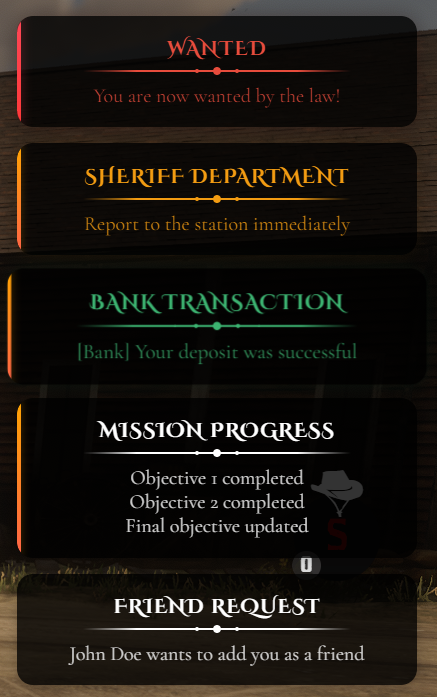
📸 Show your community what Crowe Notification looks like in action!
✨ Key Features
🛎️ Smart Notification Stacking
- Multiple notifications display simultaneously, with smooth slide-in animations and automatic priority ordering (info, job, social, emergency, etc.)
🎨 Dual Visual Themes
- Switch between modern and Wild West parchment styles. Fully customizable via Tailwind-based classes.
🧠 Auto Priority Detection
- Automatically categorizes messages based on keywords (“sheriff”, “bounty”, “emergency”) or allows manual override.
🔊 Unique Sounds & Animations
- Choose from period-authentic sound effects (typewriter, bell, gun-click, money, alert). Animations include fade, shake, pulse, slide-in.
🏷️ Built-in Templates
- Predefined formats for Telegrams, Bank, Bounty, Sheriff, Doctor, Gang, and more—just pass the template key!
🖱️ Clickable & Persistent
- Make notifications clickable (open links or trigger actions) and/or persistent until manually dismissed.
🧩 API & Event Integration
- Simple exports and events supported. Use grouped notifications, legacy methods, or advanced options.
⚡ Performance Optimized
- Lightweight NUI only active when used. Idle CPU footprint is zero.
📱 Responsive Design
- Adapts smoothly to all screen sizes and resolutions.
⚙️ Fully Configurable
- All settings in
config.lua: position (5 positions), duration, theme, colors, sounds, animations, templates, priority keywords, localization.
🧠 Notification Types & Priority
info– basic tips and informational messagessuccess– green-accented confirmationswarning– orange alertserror– red, pulsing emergency alertsjob– mission/task updatessocial– player messages/invitesemergency– highest urgency (death, law alerts)
🧰 Sample Usage
exports['crowe_notification']:NotifyInfo('Tip', 'Press E to interact')exports['crowe_notification']:Notify({
type = "success",
title = "Welcome!",
message = "You’ve joined the server.",
priority = 2,
duration = 5,
animation = "fade‑in‑up",
sound = "typewriter.ogg",
persistent = false
})🧩 API & Events
Exports:
Notify(data)– General notification (all options)NotifyEmergency(title, message, options)NotifyJob(title, message, options)NotifySocial(title, message, options)NotifyInfo(title, message, options)NotifyGroup(groupId, title, message, options)addNotification(message, type, duration)(legacy/simple)
Client Events:
TriggerEvent('Crowe:Notify', {...})TriggerEvent('Crowe:NotifySimple', message, type, duration)
Server Events:
TriggerClientEvent('Crowe:NotifyEmergency', playerId, 'WANTED', 'You are now wanted!')TriggerClientEvent('Crowe:NotifyJob', playerId, 'Sheriff', 'Report to the station')TriggerClientEvent('Crowe:NotifyGroup', playerId, 'bank_heist', 'Bank Robbery', 'Vault breached!')
🧰 Dependencies
vorp_core- Optional: Crowe scripts for advanced integration
⚙️ Installation
- Ensure you have RedM installed
- Place
crowe_notificationin your server’s/resourcesdirectory - Add
ensure crowe_notificationto yourserver.cfg - Configure
config.luato your preferences - Restart your server
📦 What You Will Receive
- ✅ Fully optimized
crowe_notificationRedM script (Keymaster escrow encrypted) - 🧩 Editable
config.luafor easy customization - 📘 Full installation + usage guide
- 📤 Automatic delivery via Keymaster (Tebex orders)
- 🤝 Manual delivery (PayPal) available via Discord support ticket
🔧 Installation
- Ensure your server is RedM compatible
- Place
crowe_notificationin your server’s/resourcesdirectory - Add
ensure crowe_notificationto yourserver.cfg - Configure
config.luato suit your setup - Restart your server
🔑 License
This script is licensed for personal use only.
Redistribution, resale, or use on unlicensed servers is strictly prohibited.
- Escrow‑protected via Cfx.re Keymaster
- Licensed for use on one (1) server key
🙋 Support
Need help?
- 📖 Review the README for configuration guidance and known issues
- 🧑💻 Join our Discord Server for support and community
- 📨 Or open a support ticket via Tebex or email