 Crowe Scripts
 Join our Discord
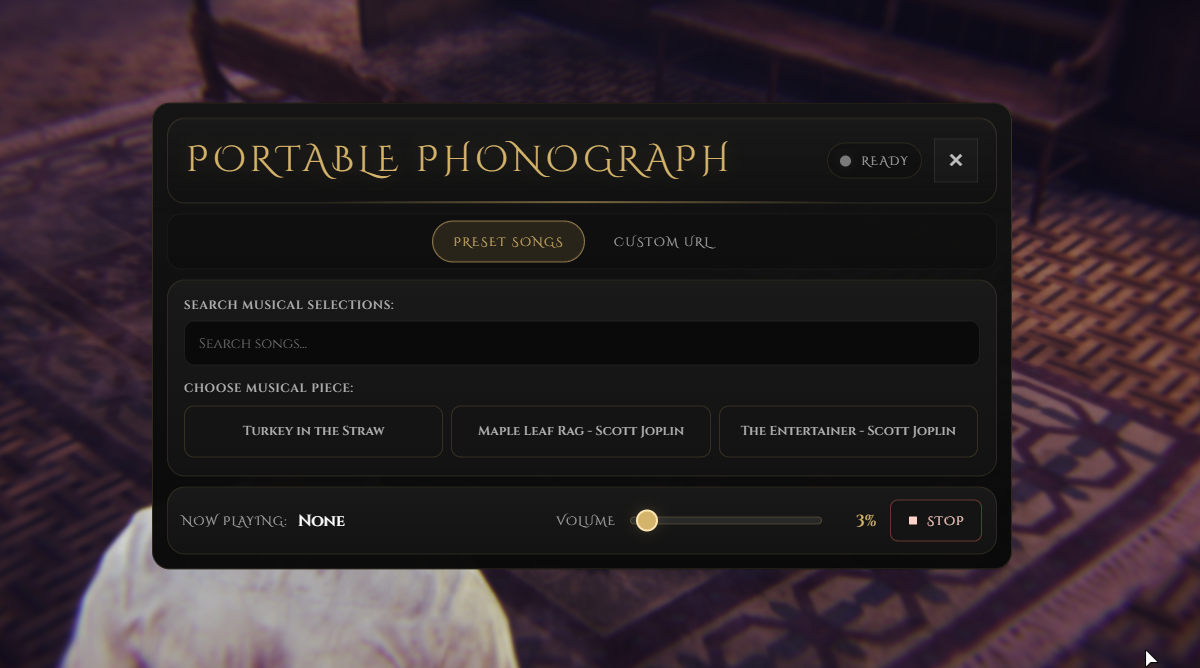
Crowe Musicbox brings portable phonograph playback to RedM/VORP by letting players open a music player directly from inventory and carry the sound with them instead of tying playback to a placed world prop.
It is built for servers that want the same general Crowe phonograph feel in a faster personal-use format, while still giving owners control over preset songs, custom URLs, sound distance, optional queue controls, and the portable inventory item setup. This release is now available as a free Crowe resource.
Showcase
Watch the demo video: YouTube Showcase
Key Features
Portable Playback
Inventory-Opened Player - Using the configured item opens the music player immediately.
Owner-Following Music - Playback follows the player who started it instead of staying attached to a placed prop.
Positional Audio - Music stays world-based with a configurable sound distance.
No Placement Required - No custom table or world placement flow is needed for use.
Portable Player Flow
Portable Defaults - Supports preset songs, optional custom URLs, smaller range, and no queue by default.
Optional Queue Controls - Queue controls can be enabled when you want a broader portable music flow.
Song Options - Owners can enable preset song lists, custom URL playback, or both.
Included Setup
Portable Item SQL - Includes
inventory_items.sqlfor theportable_phonographitem.Inventory Image - Includes
inventory_images/portable_phonograph.pngfor the item icon.Portable-Specific Wiring - Uses the current Crowe phonograph player style in a portable item flow.
Included Portable Systems
Portable item:
portable_phonographPortable playback: preset songs, custom URL playback, and optional queue controls
Song sources: preset song list and custom URL playback
Included files:
inventory_items.sqlandinventory_images/portable_phonograph.pngConfig areas: portable items, volume, sound distance, cooldowns, queue toggle, and song list
Dependencies
Required:
vorp_core,vorp_inventory,xsound
Installation
Place the resource in your server resources folder as
crowe_musicbox.Add
ensure crowe_musicboxaftervorp_core,vorp_inventory, andxsound.Run
inventory_items.sql, or manually add an inventory item namedportable_phonograph.Use
inventory_images/portable_phonograph.pngfor the item icon, and updateConfig.PortableItemif you rename the item.Restart the server or resource.
What You Will Receive
The Crowe Musicbox resource with portable phonograph playback, owner-following positional music, and optional queue controls
Included item SQL, portable item image, configurable song options, and portable-focused music flow
README guidance for setup, portable item naming, sound distance, cooldowns, and playback configuration
Support
Review the included README for setup and configuration guidance
Join our Discord for ticket-based support